Production agents on Google Cloud, governed end-to-end with Onyx.
Onyx captures the full reasoning of every production agent, attributes every tool call to the correct identity, and intervenes on suspicious or risky behavior.


The Gemini Enterprise Agent Platform Security Challenge
The Gemini Enterprise Agent Platform agents reason over enterprise data, call external tools, invoke MCP servers, and act on behalf of users at scale. Each agent is a production workload with its own credentials, its own tool connections, and its own blast radius.
That production-grade autonomy creates a new security challenge: the security event is the agent's decision, not the model's response. Google Cloud native controls govern identity and infrastructure. They do not show the reasoning trace behind a multi-step task, the chain of tool calls and MCP invocations the agent made along the way, or the off-scope action an agent decided to take on its own. They do not extend to the Vertex AI workloads, browser Gemini sessions, or non-Google AI activity running in the same organization.
Extending visibility, governance, and security to the agents and their connected tools is essential to protecting agentic workflows in production. Onyx makes it simple to safeguard agents built on Gemini.
Bringing the Gemini Enterprise Agent Platform into Onyx's Secure AI Control Plane
Onyx integrates with the Gemini Enterprise Agent Platform through Google Cloud management APIs. Setup uses a scoped, read-only role deployable through the Google Cloud console or your existing infrastructure-as-code tooling.
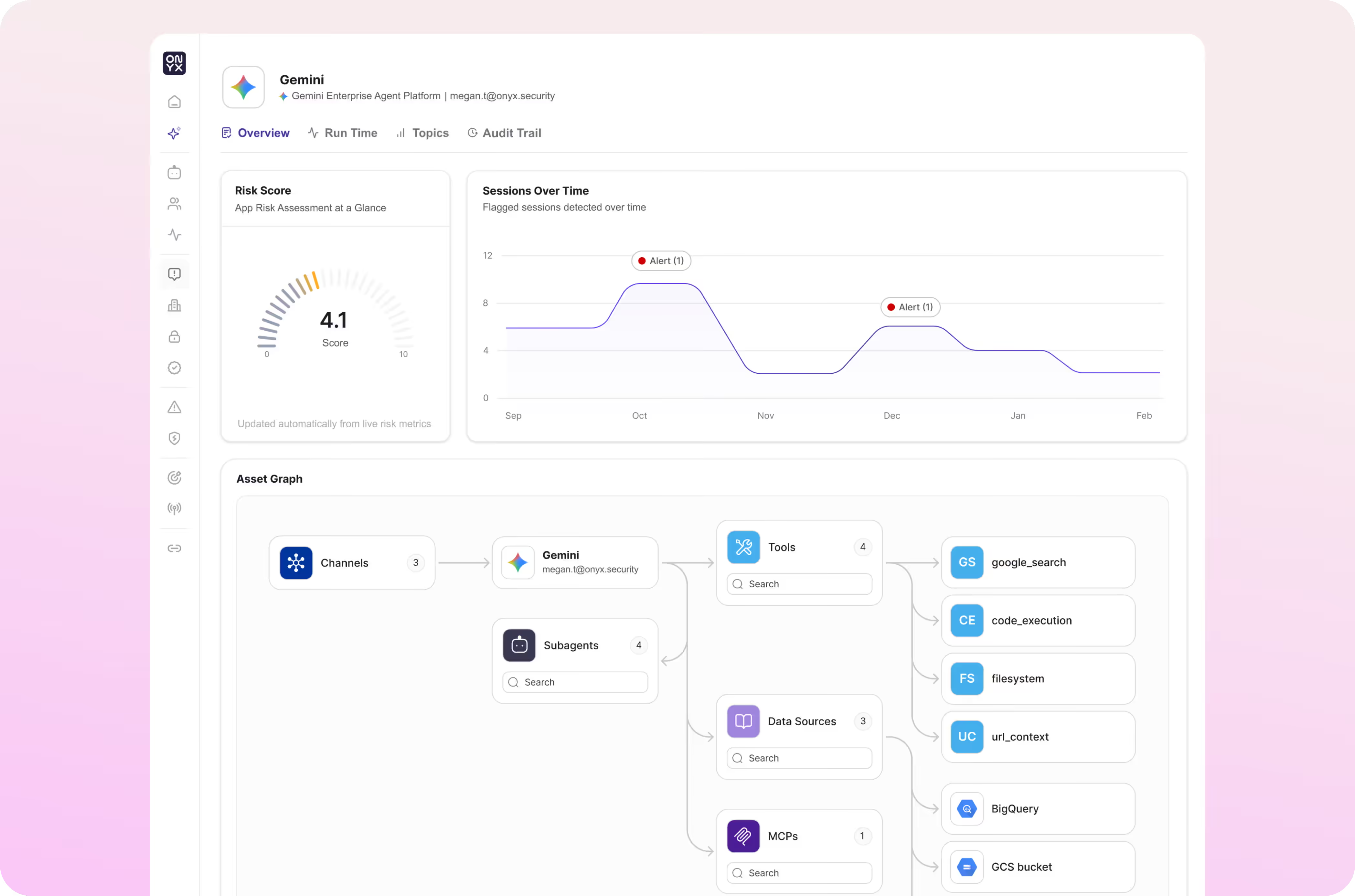
Every agent surfaces with its configuration, identity, tool connections, MCP server bindings, and the reasoning trace behind every task it has executed. The full identity chain travels with each action: the invoking user, the agent owner, and the per-tool-call or per-MCP-call identity the agent uses at each step. Most environments produce a working agent inventory within 24 hours of deployment.
This feeds into the Onyx model engine, allowing Onyx to continuously enforce policy across the agent reasoning layer and the MCP layer, surface off-scope reasoning that would lead to off-scope action, and alert on every risky multi-step decision.
The Benefits of
Onyx + Gemini Enterprise Agent Platform

Observability
See every production agent on the platform, the reasoning trace behind each multi-step task, every tool and MCP call the agent made, and the identity in use at each step.
Governance
Evaluate Agent Platform activity against natural-language policies, alert on noncompliant multi-step decisions, and create an audit trail mapped to OWASP LLM Top 10, NIST AI RMF, MITRE ATLAS, EU AI Act, and ISO 42001.

Security Posture
Continuously assess production agents for misconfigurations, excessive permissions, identity drift, and prompt-injection susceptibility, with Agentic Red Teaming findings translating directly into runtime policy.

Runtime Security
Inspect every prompt, tool call, and MCP call inline, catch off-scope reasoning that would lead to an off-scope action, and steer the unsafe action toward a safe alternative without stopping the multi-step workflow.
One Policy Across the Agent Platform and the Rest of Your AI Stack
Most enterprises shipping on the Gemini Enterprise Agent Platform run agents alongside Vertex AI, Gemini in the browser, Copilot Studio, Bedrock, AgentCore, and coding agents on every developer endpoint. Reconciling security across those surfaces by hand burns analyst time and leaves gaps between them.
Google Cloud native controls govern identity and infrastructure. Onyx governs what each production agent decides to do with the access it has. Application developers keep shipping multi-step autonomous workflows; security teams gain visibility into the reasoning behind every action and the controls needed to intervene before an off-scope step lands.
To see the impact of real-time AI security with Onyx and the Gemini Enterprise Agent Platform, schedule a demo.
Current Onyx customers can get started by following these simple integration steps.
What you'll need before you start
- 1
An Onyx Admin Account
- 2
A Gemini Enterprise Agent Platform deployment in your Google Cloud project
- 3
A scoped Google Cloud read-only role authorized for agent platform telemetry
In Onyx, select the Gemini Enterprise Agent Platform integration card.
Authorize the Google Cloud connection and Onyx will begin discovering and inspecting every agent on the platform.